
How Tranter IT is Transforming Businesses Across Nigeria

In an evolving digital landscape, one name continues to redefine the business-technology conversation in Nigeria—Tranter IT Infrastructure Services Limited. More than just an IT solutions provider, Tranter IT has become a trusted transformation partner for enterprises seeking growth, agility, and digital resilience.

🚀 From Support to Strategy: A Paradigm Shift in IT

When most organizations were still viewing IT as a backend function, Tranter IT made a bold shift—positioning technology as a business driver. By offering end-to-end IT support, infrastructure management, and enterprise solutions, the company empowered clients to move from firefighting to future-proofing.

Whether it’s a fast-growing fintech startup or a large oil and gas enterprise, Tranter IT provided tailored support that evolved with each client’s unique growth curve.

🔧 Managed Services That Just Work

Tranter IT’s Managed Service Provider (MSP) model has been a game-changer for businesses lacking the bandwidth or technical depth to manage complex infrastructure. With round-the-clock monitoring, automated maintenance, and proactive issue resolution, businesses now operate with reduced downtime and predictable IT costs.

This isn’t just outsourcing. It’s outsourcing with intelligence, backed by certified professionals and enterprise-grade tools.

🧠 Driving Smarter Decisions with ManageEngine

As a premium ManageEngine partner, Tranter IT has helped organizations unlock powerful insights into their IT environments. With tools like ServiceDesk Plus, Endpoint Central, OpManager, and ADAudit Plus, clients have gained:

  • Centralized IT control

  • Improved compliance posture

  • Enhanced user support experience

  • Real-time visibility across networks and endpoints

The result? Faster decision-making and optimized operations, even for non-tech-savvy business leaders.

🌍 Local Presence, National Impact

Tranter IT’s impact extends beyond Lagos. With service footprints across Nigeria’s major commercial cities, the company supports remote sites, data centers, and field offices—bridging the urban-rural IT gap. Its Field Support Engineers (FSEs) work closely with client teams, bringing real-time expertise where and when it’s needed.

This “feet-on-the-ground” model, combined with remote NOC/SOC capabilities, has helped industries like banking, education, retail, and manufacturing scale with confidence.

🤖 AI, Automation, and What’s Next

The company’s recent push into AI-powered IT operations (AIOps), cybersecurity, and cloud migration is reshaping how Nigerian businesses view digital transformation. At industry events like ITCON Nigeria, Tranter IT has led thought leadership sessions, educating enterprises on why deep engagement with AI is non-negotiable.

From deploying intelligent ticket routing to predictive maintenance and automated patching, Tranter IT is not just keeping up—it’s setting the pace.

💬 What Clients Are Saying

“Working with Tranter IT feels like having an internal IT department that’s 10x smarter and always a step ahead.”
— Operations Lead, Financial Services Firm, Abuja

“Their people-first approach, combined with technical excellence, helped us stabilize our IT infrastructure and focus on innovation.”
— Head of IT, Healthcare Group, Lagos

💡 The Tranter IT Difference

What makes Tranter IT stand out isn’t just technology—it’s trust, tailored service, and a culture of innovation. As digital transformation continues to sweep across Nigeria, businesses need more than vendors; they need visionaries.

And that’s what Tranter IT has become.


Are you ready to transform your business?
Let’s talk. Send an mail to enquiries@tranter-it.com to explore our services or request a consultation.


Minimizing downtime in Business environments with ManageEngine solution

Agenda

TIME                                            DESCRIPTION (Day 1)

11:00 AM                                       Introduction of guest speaker

11:10 AM                                      ITOM-ManageEngine Opmanager Plus as a focus.

12:00 AM                                      Demo on Op Manager Plus.

12:10 PM                                       Sales Engagement Process

12:15 PM                                       Question and Answers

12:20 PM                                       Closing

TIME                                            DESCRIPTION (Day 2)

11:00 AM                                       Introduction of guest speaker

11:10 AM                               ITSM-ManageEngine ServiceDesk Plus &                          SupportCentre Plus as a focus

12:00 AM                                      Demo on ServiceDesk Plus.

12:10 PM                                       Sales Engagement Process

12:15 PM                                       Question and Answers

12:20 PM                                       Closing

TIME                                            DESCRIPTION (Day 3)

11:00 AM                                      Introduction of  Guest Speaker

11:10 AM                                      SIEMs-ManageEngine Log Management  as a focus

12:00 AM                                      Demo on Log 360

12:10 PM                                      Sales Engagement Process

12:15 PM                                      Question and Answers

12:20 PM                                      Closing

Date & Time

6th- 8th AUGUST 2024. 11:00 AM DAILY (WAT)

Why Attend This Webinar?

  1. Understanding Downtime and Its Impact: Explore the causes and consequences of downtime in business environments and the importance of proactive management.
  2. Comprehensive Solutions with Manage Engine: Gain insights into the suite of ManageEngine tools designed to monitor, manage, and optimize your IT infrastructure.
  3. Real-World Case Studies: Learn from real-life examples of businesses successfully minimising downtime using Manage Engine solutions.
  4. Practical Implementation Strategies: Discover actionable steps to integrate Manage Engine into your existing systems for maximum efficiency and minimal disruption.
  5. Interactive Q&A Session: Get your questions answered by our expert panel during the live Q&A session.

Safeguarding the Digital Fort: A Tale of 5 Common Cybersecurity Threats in 2024

Sarah, a whirlwind of creativity, had built her marketing agency from the ground up. Working from her home office, she juggled client calls, social media strategies, and design concepts. Business was booming, and Sarah felt confident – until one seemingly ordinary Tuesday morning.

An email arrived, supposedly from her bank. It blared about suspicious activity and urged her to click a link to verify her account. With a busy day ahead, Sarah clicked, a nagging feeling brushing aside her usual caution.

Moments later, Sarah’s world froze. Her computer screen displayed a horrifying message: all her files were encrypted, held hostage by a vicious ransomware program. Client presentations, design mockups, confidential contracts – everything was locked away, demanding a hefty ransom for release. Panic clawed at Sarah’s throat. Her business, her livelihood, was crippled.

The Hero Emerges: Acronis Cyber Protect Home Office to the Rescue!

Just when despair threatened to engulf her, Sarah remembered a recent investment – Acronis Cyber Protect Home Office. This comprehensive security solution, a quiet hero in the background, offered features she hadn’t fully explored. A glimmer of hope ignited.

Let’s delve into the five most prevalent dangers and how Acronis Cyber Protect Home Office can fortify defenses against them.

Threat #1: Phishing Attacks.

Phishing is a deceptive tactic where cybercriminals attempt to trick individuals into revealing sensitive information through fraudulent emails or websites. Acronis Cyber Protect Home Office offers robust email security and real-time threat detection to thwart phishing attempts.

Threat #2: Ransomware

Ransomware is a malicious software that encrypts files, rendering them inaccessible until a ransom is paid. Acronis Cyber Protect Home Office provides backup and recovery features to help businesses restore encrypted data without succumbing to ransom demands.

Threat #3: Insider Breaches

Insider breaches occur when individuals within an organization misuse their access privileges to compromise security. Acronis Cyber Protect Home Office monitors user activity and detects anomalous behavior, helping prevent insider threats.

Threat #4: Supply Chain Attacks

Supply chain attacks involve exploiting vulnerabilities in a business’s interconnected ecosystem through compromised vendors or software updates. Acronis Cyber Protect Home Office conducts vulnerability assessments and ensures secure software deployment to safeguard against supply chain sabotage.

Threat #5: IoT Insecurities

In an era of interconnected devices, IoT insecurities pose a significant threat to businesses. Acronis Cyber Protect Home Office offers advanced threat prevention and device management capabilities to secure endpoints and protect against IoT vulnerabilities.

As businesses navigate the complex landscape of cybersecurity threats in 2024, Acronis Cyber Protect Home Office stands as a reliable ally, providing comprehensive defense mechanisms to safeguard against cyber attacks. With proactive measures in place, businesses can strengthen their digital fortresses and mitigate the risks posed by modern-day adversaries.

The Takeaway: Be Prepared, Not Scared

Cybersecurity threats are real, but so are the solutions. This story isn’t just about Sarah; it’s about every business owner working remotely.  By implementing a robust security solution like Acronis Cyber Protect Home Office, you can mitigate these threats, ensuring your data remains safe, accessible, and protected. Don’t wait for disaster to strike. Take control of your cybersecurity today and keep your business thriving.

Contact us for the best cybersecurity solution in town.

ManageEngine’s Reseller Training Event in Lagos Marks Milestone in Technology Advancement

Leading IT management solutions provider, ManageEngine, a subsidiary of Zoho Corporation, successfully hosted a comprehensive training event for its resellers from the 7th to the 11th of August, 2023. The event took place at the esteemed Radisson Blu Anchorage Hotel in Victoria Island, Lagos, Nigeria. With a focus on empowering resellers with insights into cutting-edge technology solutions, the event was attended by key figures from both ManageEngine and Tranter IT, along with prominent business managers, sales representatives, and executives.


The training event was graced by the presence of distinguished individuals, including members of the ManageEngine team: Srinivasan Rajasekaran, Product Specialist; Jothi Murugan Suresh Madurai; Keertikumar; and Shariba T. Representing Tranter IT were the esteemed duo, Lare Ayoola, Chief Executive Officer, and Melanie Ayoola, Executive Director.


Srinivasan Rajasekaran, Regional Sales Manager, opened the event with an impactful speech, recounting the journey that led to the establishment of ManageEngine’s significance in Nigeria. “Nine years ago, we identified ManageEngine as an essential technology for Nigeria. We took up the mantle, established Zoho Corps as a subsidiary, and inked a pivotal agreement,” Rajasekaran shared. He emphasized the pivotal role that ManageEngine’s application software plays in the digital economy, stating that it has significantly shaped the technological landscape.


Lare Ayoola, CEO of Tranter IT, also addressed the audience, describing 2023 as a remarkable year of accomplishments and growth for ManageEngine. Ayoola reaffirmed the company’s dedication to innovation across its array of solutions and expressed heartfelt appreciation for the global network of partners that form the cornerstone of ManageEngine’s success.


During a session moderated by ManageEngine’s Product Specialist, Jothi Murugan, attendees delved into critical topics such as automation within organizations and the pressing need to streamline IT and business processes. Jothi Murugan highlighted the challenges faced by organizations in configuring assets for remote and hybrid work environments, underscoring the immediate focus on resolving these concerns.


The event also spotlighted Enterprise Service Management, a pivotal component of ManageEngine’s unified solutions. Jothi Murugan explained that while every department in an organization offers services, it is IT that extends these services to ensure efficiency and efficacy. The focus on enterprise services aligns service management with the organization’s overall objectives.


Osita Okolie, CEO of Collaborative Technologies, echoed the sentiments of many attendees, expressing excitement about the insights gained from the event. Okolie praised ManageEngine’s unified solutions for their ability to simplify processes, reduce costs, mitigate risks, and optimize resource allocation. He encapsulated the event’s significance by emphasizing how ManageEngine’s solutions are closing potential security gaps while enhancing operational efficiency.


As the event concluded on a high note, attendees left with renewed enthusiasm and a deeper understanding of how ManageEngine’s technological innovations are reshaping the landscape of IT management.


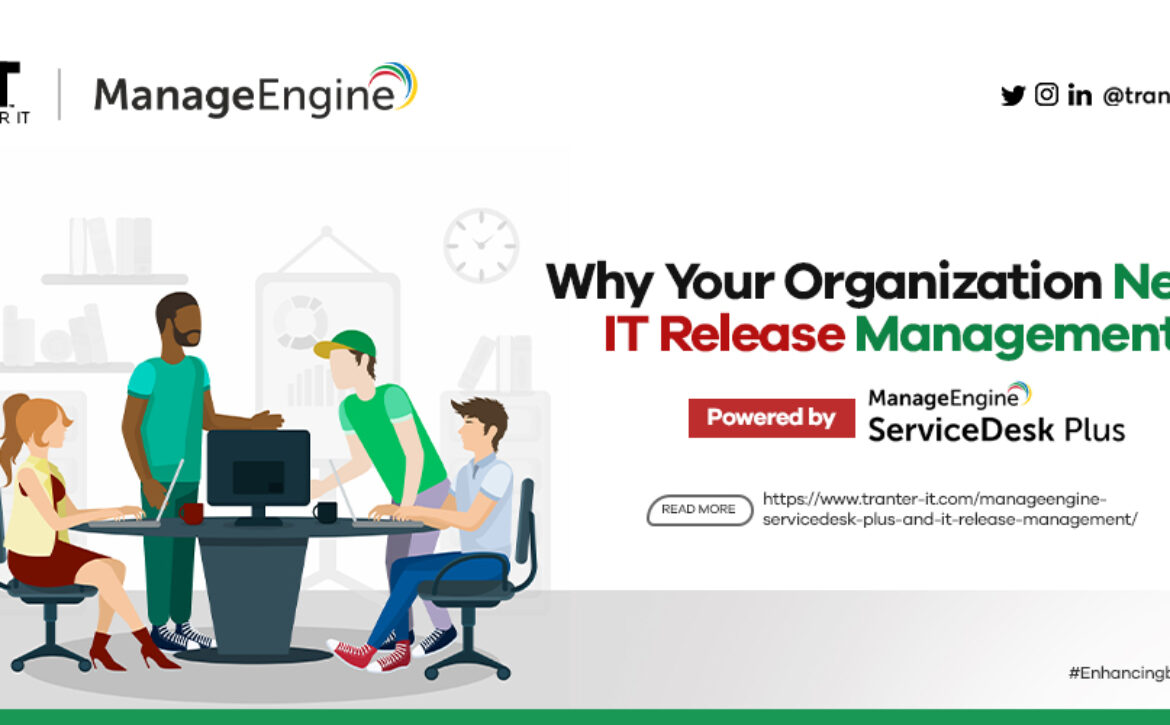
ManageEngine ServiceDesk Plus and IT Release Management

As organizations evolve, they often need to upgrade their IT infrastructures regularly, part of which involves software releases. Such software releases, whether simple or complex, are plagued with common challenges like lack of communication between different teams, scheduling conflicts, and absence of central control. Failing to adequately address these challenges may result in underdeveloped or failed releases. This can cause a backlog of pending releases and an increase in outages leading to costly downtime that could have otherwise been prevented.


Helping businesses deliver a seamless customer experience and ensure zero downtime has always been a key aspect of ManageEngine ServiceDesk Plus.


ServiceDesk Plus and IT Release Management enable you to establish a clear governance structure through release roles, automated workflows, and customizable templates. We ensure that changes are released effectively through management that works in tandem with change management to offer transparency and central control. And that’s exactly what ServiceDesk Plus’ new capability provides.


IT Release Management refers to the process of planning, designing, scheduling, testing, deploying, and controlling software releases. It ensures that release teams efficiently deliver the applications and upgrades required by the business while maintaining the integrity of the existing production environment.


IT software upgrade releases have never been easier and more secure from risks that impede your organization’s day-to-day operations, making for a seamless and effective release management process. API-level integration enables IT teams to resolve issues much faster, increases the productivity of IT personnel, and improves end-user satisfaction, the process of resolving tickets still has to be done manually.


There are a few steps to IT release management. They are;


  • Request: Release management starts with requests for new features or changes to existing functions. There’s no guarantee that all requests made will eventually translate into a new release. Each request is evaluated for its rationale, feasibility, and whether there’s a way to fulfil it by reconfiguring the application version already in production.


  • Plan: A robust plan ensures the release team stays on track and that requirements are satisfied. Create or reuse a workflow or checklist that can be referred to by stakeholders throughout the release process.


  • Design and Build: This is the programming phase where the requirements are converted to code. The release is designed and built into executable software.


  • Testing: Once the release is deemed ready for testing, it’s deployed to a test environment where it’s subjected to non-functional and functional testing (including user acceptance testing or UAT). If bugs are found, it’s sent back to developers for tweaking and then subjected to testing again. This iterative process continues until the release is cleared for production deployment by both the development team and the product owner.


  • Deployment: The release is implemented in the live environment and made available to users. It entails educating users on the changes and training them on how to operate the system in the context of the new features.


  • Post-Deployment: Post-deployment, the release moves to the support phase where any bugs are recorded that will eventually necessitate a request for changes. 


For an IT release to be deemed successful, it must attain the following objectives:


  • It’s deployed on time.

  • It’s deployed within budget.

  • It has little to no impact on current users.

  • It satisfies the needs of current and new users, technological advances and/or competitive demands.

How can ServiceDesk Plus help?


  • Simplify IT upgrades: Integrated with the Change Management module, you can associate changes to releases, thereby carrying over all the necessary documentation entered in the change ticket.
  • Provide an Integrated calendar view: All scheduled releases and changes are highlighted in both modules through the integrated calendar view, ensuring that no scheduling conflicts arise.
  • Offer Predefined release workflows: The graphical drag-and-drop canvas for release workflows enables you to create custom workflows for various types (Major, Minor, or Emergency) of releases.
  • Stay in control of software release processes: Define and manage different types of releases (Major, Minor, Emergency, etc.) with custom workflows.
  • Establish a clear governance structure: Associate roles with predefined templates to manage releases in a standardized manner.

Improving Password Security: How To Break The Security Barrier

World Password Day was celebrated globally on May 4th 2023 with lots of emphasis on the improvement of password safety against breaches digitally with little or no mention of manual and safer means.


Imagine a world beyond passwords, where users can securely access data at any place at any time without having to validate themselves manually. A post-password world is no longer a distant dream, but instead a closely approaching reality.


Data breaches involving social engineering and credential misuse accounted for 82% of breaches in 2022, according to a recent study by Verizon. Online security might seem impossible without passwords, however, many users still practice poor password hygiene, posing a huge risk when it comes to cyber threats such as brute-force and dictionary attacks.


“Treat your password like your toothbrush. Don’t let anybody else use it, and get a new one every six months.” – Clifford Stoll, Astronomer & Engineer


It’s 2023—Are passwords still relevant today?


Technology is fast-paced. A lot has evolved in cybersecurity over the last few years—security norms, device smartness, biometric authentication, and security best practices. But one thing has never lost its significance: the password.


Passwords still serve as the simplest and most effective means to guard access to data, privileged accounts, or most digital resources. Passwords never go out of fashion because they are easy to use, easy to change if needed, cost-effective, and do not demand additional software or hardware to function.


Thinking Beyond Passwords with ManageEngine.


Passwords alone aren’t enough to protect against attacks, regardless of whether you want to go passwordless or consider them indispensable. With our webinar, you’ll learn how to implement a context-based identity defence strategy that uses modern authentication factors for secure access to resources.


You’ll gain insight into the alternative methods that can help enhance identity protection on the internet and learn how to implement these strategies across your organization.


What are you waiting for? Sign up today for a solution from ManageEngine to be fully protected and proactively avert severe consequences such as reputational damage, loss of business data, and financial costs.

All You Need to Know about the Benefits of Cybersecurity for your Business

In a world where risks are on the rise, cybersecurity is key. Cybersecurity refers to the body of technology processes, and practices designed to protect networks, devices, programs, and data from attack, damage, or unauthorized access. Cybersecurity is the protection of internet-connected systems such as hardware, software and data from cyber threats. This practice is used by individuals and enterprises to protect against unauthorized access to data centres and other computerised systems. It can also be simply said that Cybersecurity is “Risk Management”.

Some reasons your business needs a cybersecurity system

•Protection against External Threats: Millions of cyber threats are created every year and at great cost to businesses. While primarily launched for financial gain, the reasons behind cyber-attacks vary as the perpetrators themselves. Whether it is cyber criminals, hacktivists, or industrial spies, the common ground these bad actors share is how agile, sophisticated, and stealthy their attacks are becoming.


•Protection against Internal Threats: The weakest link in the cyber security chain remains the human factor. Whether it’s accidental, negligent, or outright malicious, insider threats can come from current or former employees, third-party vendors, or even trusted partners. But with proactive monitoring of networks and managed access, detecting and responding to threats can cut down on costly incidents. Moreover, providing consistent, up-to-date training can help turn risks into another extension of the cyber security solution you need.


•Regulation Compliance: For industries that still remain under-regulated, there’s an opportunity for businesses to invest in cyber security and see compliance as more than an obligation. In fact, according to data privacy and cyber security law experts, leaders could approach cyber security in regulatory compliance as “a competitive advantage, getting ahead of industry competition before under-regulated industries become regulated.”

•Improved Productivity: Viruses and other cyber-attacks can slow networks and personal devices down to a crawl, making it virtually impossible for employees to work, for websites to function, and for businesses to operate. By implementing a range of cyber security measures such as improved firewalls, virus scanning and automated backups, you can drastically reduce violations and the downtime it takes to remedy the breach. Education and training can also help guide employees in identifying potential email phishing scams, suspect links, and other nefarious criminal efforts.


•Cost Savings and Value: As cyber-attacks only continue to grow more sophisticated and complex every day, it’s important to weigh the cost of dealing with one attack versus the value of taking preventative measures. By mitigating risks, you put your business in a better position to respond, recover, and keep existing customers happy, a far more cost-efficient option than attracting new ones.


•Brand Trust and Reputation: Perhaps the greatest case to make for cyber security in business is the reputation that you earn and keep. One of the most important factors in business growth is customer retention. Maintaining brand loyalty through a strong cyber security position is paramount for customers today and the shortest path to repeat business, recommendations, and higher per-ticket purchases. It also opens doors to potential future ventures and expansion, helping producers land on the vendor list with larger organizations as part of their supply chain that is only as strong as their weakest link.


As a business, looking to maximise diverse commercial opportunities, maintain a sterling brand perception, and grow, you must adopt cyber security to protect your networks, devices, programs, and data from attack, damage, or unauthorized access from potential cyber-attacks.


You can sign up for a tool like Acronis to be fully protected and proactively avert severe consequences such as reputational damage, loss of business data, and financial costs.

Why Patch Manager Plus is Important For Your Business

Patch management is the process of identifying, testing, deploying, and installing software patches (or updates) to computers. A software patch is a piece of code, tailored to fix existing bugs/vulnerabilities in the software, add new features, or enhance its security.

In general, the software patch management process includes scanning computers in the network for missing patches, testing them in a test group of machines, and deploying them manually or automatically via patch management tools.


Why is patch management important?

Here are some key reasons that state the importance of patch management:

  • Preventing security breaches: Software patch management or software patching is one of the most important IT tasks in any organization, as patches fix vulnerabilities in the software and applications, keeping cyberattacks at bay.

  • Ensuring compliance: With cybercrime on the rise, an integral part of a proper patch management strategy is to ensure that all the endpoints in an organization adhere to compliance standards.

  • Feature updates: Besides providing security and bug fixes, patches also introduce new features and functions which enhance the end-user experience.

  • Downtime prevention: Ransomware attacks and other cyber threats not only result in data breaches but can also cause system downtime but patch management ensures the endpoints are updated and secure, thereby preventing downtime due to security breaches.

ManageEngine Patch Manager Plus provides:


  • Windows patch management: Automates Windows patching, mitigates security risks, and fixes vulnerabilities in minutes.

  • MacOS patch management: Deploys and manages patches to all macOS endpoints from a single console.

  • Linux patch management: Provides on-demand and scheduled patch deployment of Linux-related security fixes.


If you’re looking for an affordable patch management solution that offers everything listed above, look no further! Patch Manager Plus offers all these features to help keep your network patched and secured, all from one, central location. This patch management tool is compatible with Windows, macOS, and Linux and offers a FREE edition for up to 25 devices. In addition, it also provides server patch management to help keep data secure and up to date.


Our senior IT engineers are available to schedule a remote consultation/demo of our solution with you.


CONTACT US


Email: enquiries@tranter-it.com

T: 08183405221 or 09023416588

Educational Institutions: Are They Easy Victims of Ransomware?

Educational institutions are less likely than others to detect in-progress attacks, which naturally leads to higher attack success and encryption rates.

The critical information they possess, like learning data that is supplemented with background data, provides information on how well students are learning, what variables are linked to achievement, and which groups perform poorly. This distinguishes them from the other numerous organizations targeted by the serious cyber threat. System analysis, better resource allocation, agenda setting, and the policy cycle can all benefit from this information.

According to a report by the Multi-State Information Sharing and Analysis Center, the average school spends less than 8% of its IT budget on cybersecurity, with one in five schools spending less than 1%. Cyber attackers find it easy to penetrate their networks as they have weak security compared to other industries.

9 security practices that should be followed in every educational institution.

1. Deploy stronger password policies and use two-factor authentication to keep your endpoints secured.

2. Eliminate software and firmware vulnerabilities by staying up-to-date with released patches.

3. Actively audit and monitor all activities in your network, auditing your ports, firewall, BitLocker and identifying suspicious incidents.

4. Uninstall outdated and high-risk software once identified on your network.

5. Allow installation of safe and secure applications on your network.

6. To avoid insider attacks, establish privilege management and just-in-time access controls for users.

7. Block malicious web extensions and web applications on your browsers to prevent browser-based attacks.

8. Monitor and manage peripheral devices on your network to prevent data leakage.

9. Backup your data at regular intervals


Enforcing these security practices can be a bit difficult, especially in a school environment that often has limited resources dedicated to IT security. Not all security solutions let you follow all the practices mentioned above, so it can be even more difficult for the IT admins of schools and educational institutions as they might need to maintain multiple solutions to achieve security.


Overcoming Common IT Issues Faced By Businesses & Individuals

It’s important to be aware of the most common IT challenges that can take place at home and the workplace, to remain productive everywhere.

The issues can be as simple as a slow-running computer and as complex as a smoking laptop (yes, that happens!) But, the good news is that many IT problems are pretty easy to fix and the more you know, the easier it’ll be to control and resolve them.

So, here are 7 of the most common IT issues that businesses and individuals face.

1. Forgotten Password: This seems like an inevitability in the workplace and it’s one of the top issues in IT support and troubleshooting. Coming back from holiday only to find that you’ve forgotten the key digits that’ll grant you access to your files is highly disruptive. To avoid this situation entirely, it would be a good idea to follow a strategy that would decrease the chances of you forgetting the password in the first place.

2. Accidentally Deleting Important Files: Accidentally deleting important files is also a common IT problem but it’s also one of the most avoidable. If it does happen, however, the first piece of advice would be to check the recycling bin. To provide additional layers of protection, you may benefit from using software, such as OneDrive or Dropbox, that syncs your files to the cloud. This means that a copy of your file is automatically saved to the cloud so that, even if you accidentally delete a file from your hard drive, the most recent version can still be retrieved. Although deleted files can be retrieved from synced files on the cloud, files can still be lost.

3. Slow Performance: Slow computers are a burden. Trying to complete work efficiently with a machine that is crippled by errors, weak software and insufficient RAM is a challenge to one’s patience. However, if you can get to the root of the problem, you will be able to re-energise it back to an optimal speed.

Here are the main issues you need to keep an eye out for:

  • Not utilizing RAM effectively

  • Not enough space for the hard disk

  • Too many start-up programs


4. Malware: Malware consumes a significant amount of computer memory, draining enough resources to limit its use for other legitimate programs.

5. Overheating: When your computer generates more heat than it’s able to handle, then it will overheat. This can be serious because your device may either shut down without warning or even suffer permanent damage.

To avoid this, follow these simple steps:

  • Keep it clean.

  • Give your computer some breathing space

  • Be wary of exposure to sunlight

6. Printer Problem: Printers can offer their own technical problems, ranging from reducing computer speed to being unable to carry out their primary function – to print.

Here’s what to do if you come across either of these issues:

  • Hampering computer speed: you can uninstall unnecessary applications or use disk cleanup software.

  • A refusal to print: reset your printer. Check to see if the printer is connected to the correct network – if it is Wi-Fi-enabled or via USB cable.

7. Slow Internet Connection: No internet, no work. This appears to be the rule in the digital age. A slow internet connection can be remarkably frustrating. Now that we are seeing an increase in the number of people working from home and relying on their own internet, there are inevitably going to be problems with connection from time to time. There are several ways you can troubleshoot this.

Here are three things that you can do:

-Reboot your router

-Use an Ethernet cable

-Improve your WiFi connection.

Want to learn more about our IT solutions and how they can help enhance your business?

Send us a mail at enquiries@tranter-it.com

Tel: (+234) 818 340 5221

(+234) 902 341 6588

Request a Quote